OpenAI's GPT-6 practical guide: define the task before choosing a model
The useful question is not simply which GPT-6 model is strongest. It is how model choice, instructions, execution boundaries, context, and evaluation work together on one real task.
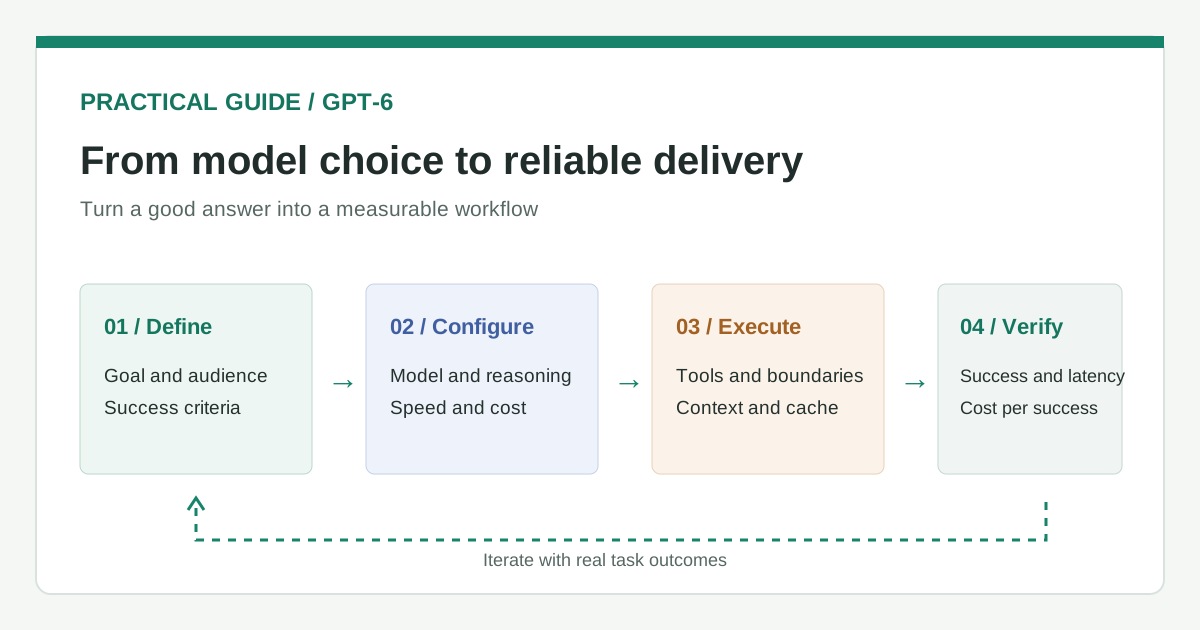
Teams often pick the most capable model first and then look for work to give it. OpenAI's guide suggests a better order: define the outcome, audience, constraints, and what completion means; then choose the model and the way it runs. That turns “the answer looks good” into “the task was actually completed.”
Which GPT-6 model fits the workload?
OpenAI gives the models different roles rather than one universal ranking. Choice depends on task difficulty, speed, and cost.
| Model | OpenAI's positioning | First tasks to test |
|---|---|---|
| GPT-6 Astra | Hardest reasoning work | Demanding analysis and judgment |
| GPT-6.1 Sol | Complex coding, research, and computer use | Engineering work across tools |
| GPT-6 Luna | High-volume, well-defined work | Extraction, classification, structured summaries |
Reasoning effort is another setting to test. Low can suit fact extraction or small edits; medium is a starting point for planning or comparison; high is for difficult debugging or deep review. OpenAI recommends starting with the model's default reasoning level in Codex, then adjusting it. More reasoning is useful only when its gain justifies the extra time and cost.
What should the instructions say?
Instructions should specify the desired result, who it serves, the relevant context and limits, and the acceptance criteria. OpenAI also recommends defining what an agent may decide on its own and when it should ask a person. Prompts, skills, and repository instructions should agree on those boundaries.
For a request to fix a sign-in bug, “done” might mean reproducing the problem, making a focused change, running the relevant tests, and checking the flow in a browser. A change in product scope or production configuration would require human review. This is more actionable than a vague instruction to “be careful.”
How do long-running agents stay on track?
The guide describes steering while a task is running, asynchronous tools that let independent work continue, and delegation of independent subtasks. It describes multi-agent workflows through the Responses API as being in beta. These features require clear dependencies: a test is not complete until its result arrives, and a changed requirement should steer the current work.
Long conversations can use compaction to retain the state needed to continue. Repeated work can benefit from prompt caching when stable instructions precede changing task details. OpenAI notes that estimates should include cache writes and any applicable long-context pricing. Neither feature guarantees savings in every workflow.
How should production readiness be measured?
OpenAI recommends representative tasks, monitoring, data controls, and measurement of task success, latency, and cost per successful task. A working demo or a successful API response does not establish that the complete workflow succeeds.
- Start with 10 to 20 real tasks. Include common cases and likely failure boundaries. This sample size is Evolve's suggested starting point, not an OpenAI requirement.
- Write an acceptance criterion for each task. Correct output, successful tool actions, and required human confirmation all count.
- Record the whole run. Connect model settings, tool time, cache use, cost, and failure reasons to the same task.
- Fix the largest source of failure first. A lost context or unreliable tool will not necessarily improve when the model is upgraded.
The guide treats GPT-6 as a configurable workflow capability, not merely a model name to swap into an API call. The right configuration is the one that works on your real tasks.