OpenAI launches gpt-transcribe and gpt-live-transcribe: real-world Word Error Rate cut in half, price down 25 percent
- Transcribe a real meeting with accents, jargon, and people talking over each other, and names and numbers get mangled. The two models OpenAI just shipped in the API are built for exactly that
- gpt-transcribe handles files that are already recorded; gpt-live-transcribe handles speech as it happens. The docs now name these two as the recommended starting point for new integrations, with the older models reserved for special cases
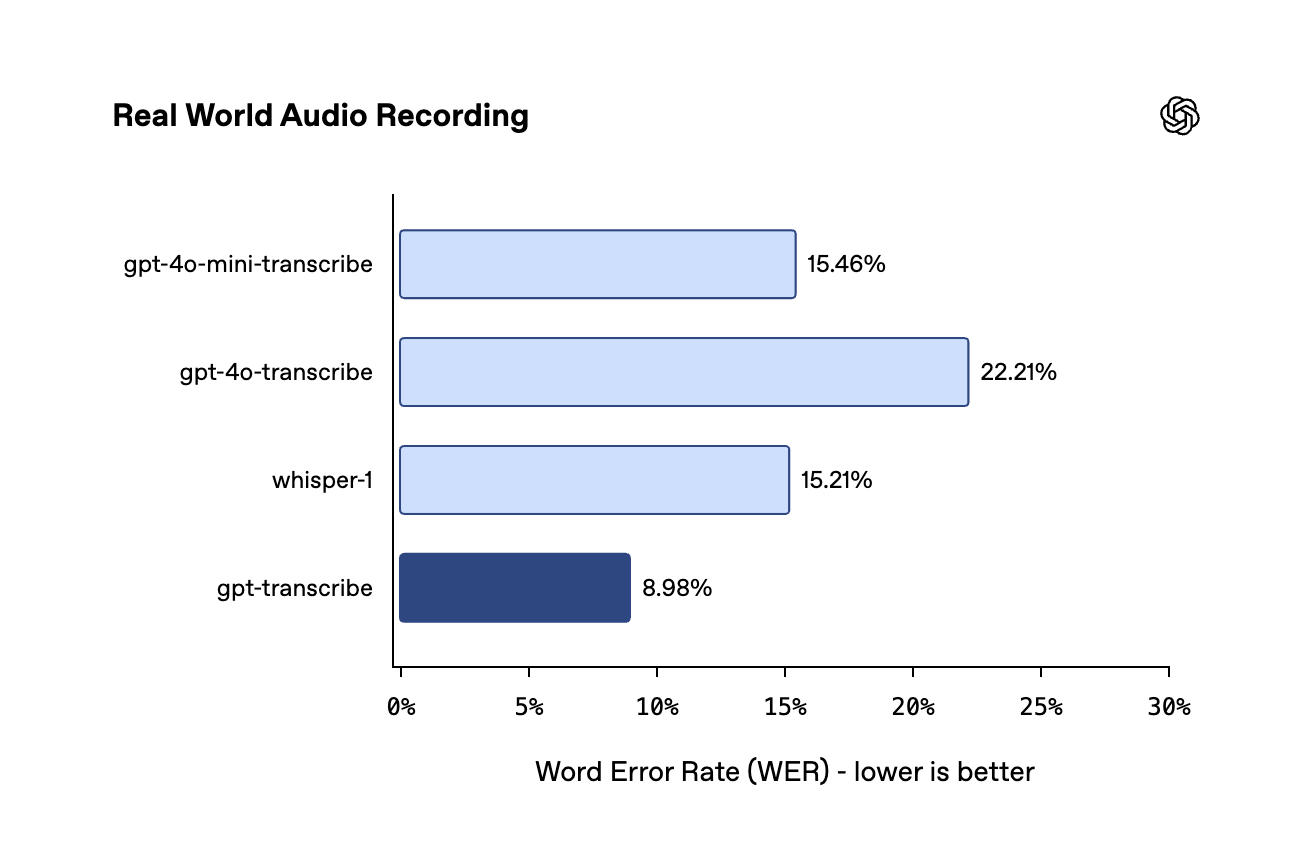
- On the real-world audio benchmark, gpt-transcribe scores an 8.98% Word Error Rate (WER), versus 15.21% for whisper-1 on the same test
- At $0.0045 per minute versus whisper-1's $0.006, it's 25% cheaper — accuracy and price are moving in the same direction this time
- The core mechanism: a request can now carry a scene description, a list of keywords, and a set of expected languages, and the model transcribes with that context already loaded
- The sharpest piece of evidence is that control experiment: add the same background context and three older models move by +0.2 points at best, with two actually dropping — a capability that has to be learned during training, not bolted on with a parameter
- But word-level timestamps, srt/vtt subtitle files, speaker diarization, and translation into English still require the older models
- One detail only shows up in the demo video: the two new models support 57 languages, while the docs say Whisper supports 98 — language coverage is actually a step backward
What this is, who shipped it, and what problem it solves
OpenAI has released two new speech-to-text models via API: gpt-transcribe, for audio files that are already recorded, and gpt-live-transcribe, for audio streaming in real time.
Docs, pricing, and endpoints were all live on launch day — this wasn't a teaser or a waitlist. OpenAI's official developer account followed up with a tweet carrying six benchmark charts and a demo video.
Each model owns one half of the job, and each has a predecessor it's stepping in for.
"Stepping in for" needs a caveat. Neither older model has been killed off — the docs' wording is that new integrations should start with these two, while gpt-4o-transcribe, gpt-4o-mini-transcribe, and gpt-realtime-whisper are "not the recommended starting point for new transcription integrations."
Note that whisper-1 isn't among the three named there. Its situation is more nuanced: for general file transcription, the docs now point to gpt-transcribe instead — but there are three specific jobs where the docs still explicitly recommend whisper-1, today. The comparison table further down has exactly which three.
"Streaming output" and "real-time audio" are two different things
There's a distinction here that's easy to blur, and the official docs devote a whole section to it — because it directly determines what you pay.
gpt-transcribe can also stream its output as it works. But what it's streaming is the progress of transcribing a file that's already fully recorded — the whole thing is already sitting on the server, and the results just arrive in batches so users aren't stuck staring at a spinner. gpt-live-transcribe is dealing with speech that hasn't finished yet, arriving piece by piece as it's spoken.
There's only one test that matters: is the audio still being produced? If yes, you need the real-time path — a WebSocket or WebRTC connection. If it's already recorded, there's no reason to reach for the real-time model even if you want a streaming-style progress effect.
This distinction matters for cost: the two models differ by 3.8x per minute. Route already-recorded audio through the real-time channel by mistake, and you're burning money for nothing.
Why this one's worth paying attention to
Over the past three years, speech-to-text has felt "good enough" — until the audio isn't clean. Then it falls short in a specific, familiar way: names get transcribed as similar-sounding words, order numbers lose a digit, industry shorthand gets garbled. You still end up re-listening to the recording before you dare publish the transcript.
What's interesting about this release is that it turns "you can tell the model ahead of time what this recording is about" into a genuine model capability. The same control experiment also proves something else in passing: older models can't just be handed this ability through a prompt — it was never trained in to begin with.
The hardest number first: error rates cut by more than half
Compare the machine transcript word-for-word against the correct transcript and count how many of every 100 words are wrong — misheard, dropped, or inserted words all count. Think of it like a teacher grading a dictation: they count every mistake, whether it's a wrong word, a missing one, or an extra one that shouldn't be there.
OpenAI published six charts across two model groups and three benchmarks. Start with file transcription. The metric on each chart is WER — lower is better.
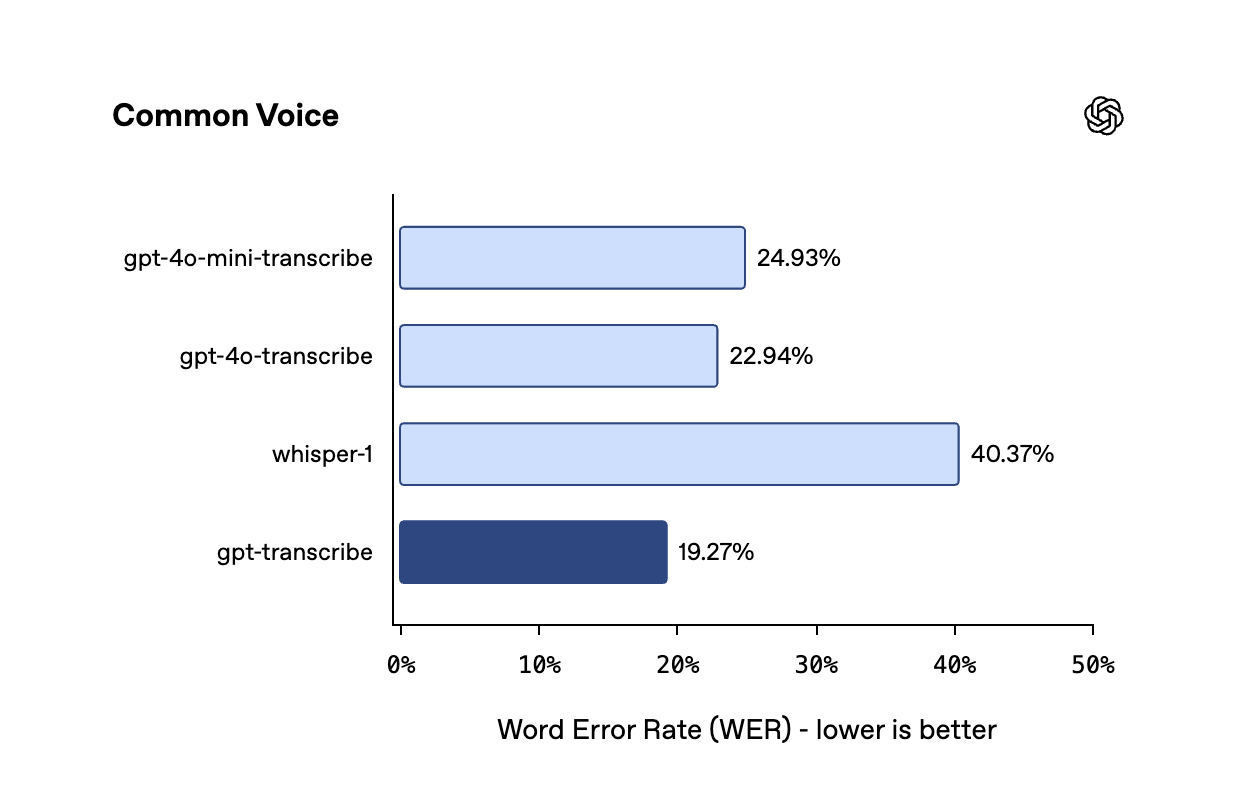
What does 40.37% actually mean? Roughly two words wrong out of every five. A transcript at that error rate basically needs a full re-listen before anyone trusts it. 19.27% is far from perfect either, but at one wrong word in five, it's at least usable as a draft — that's the gap between "redo it" and "touch it up."
8.98% works out to roughly one wrong word in 11; whisper-1's 15.21% is closer to one in every six or seven. Neither is at the point where you can skip proofreading — but the nature of that proofreading changes: instead of re-listening to the whole recording, it's a quick scan with a few fixes.
OpenAI's tweet only pits gpt-transcribe against whisper-1, but each chart actually plots four models. Lined up together, they reveal something the tweet doesn't mention: on real-world audio, gpt-4o-transcribe scores 22.21% — worse than the very whisper-1 (15.21%) it was supposed to succeed.
So the assumption that "each OpenAI transcription model is better than the last" doesn't hold — at least not on real-world audio, where one generation in the middle was a regression. This release's gains are real, but they're no guarantee the next one will land the same way.
The real-time group shows a much smaller gap
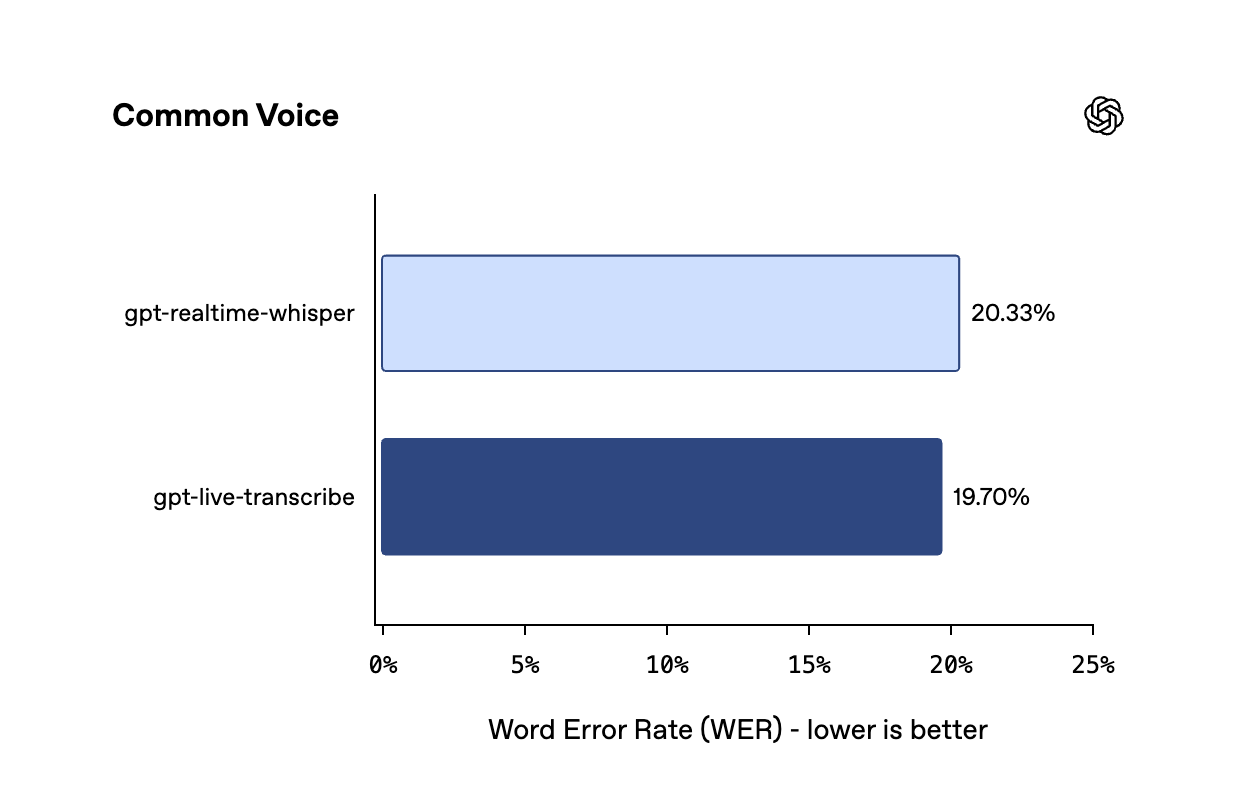
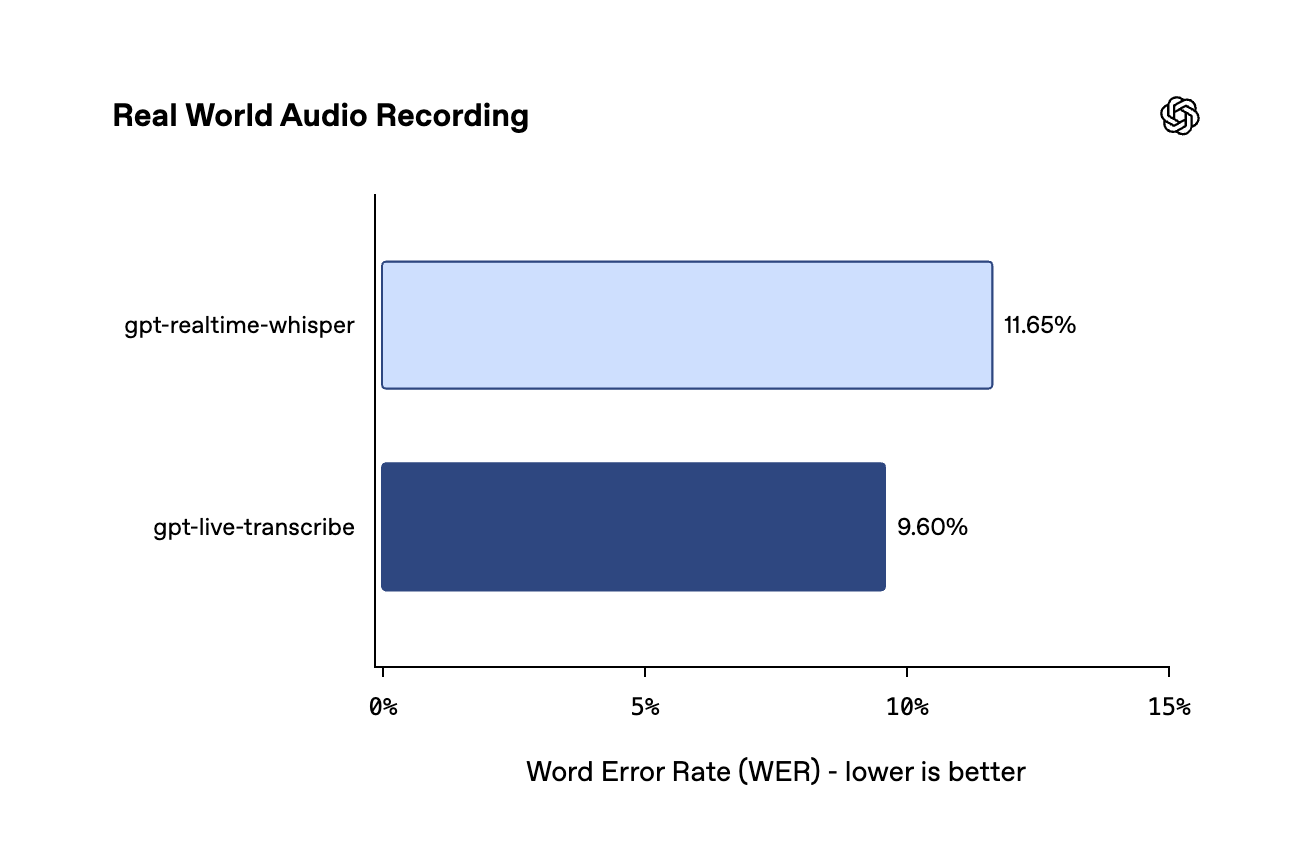
On Common Voice, gpt-live-transcribe scores 19.70% against gpt-realtime-whisper's 20.33% — a 0.63-point gap. On Real World Audio Recording it's 9.60% versus 11.65%, a 2.05-point gap.
Compared to the near-halving on the file-transcription side, the real-time improvement is much more modest. That tracks: the real-time predecessor was never as dated as whisper-1 to begin with. Starting from a higher baseline leaves less room for improvement.
The actual new thing: you can tell it what the recording is about first
The older transcription models listened blind: whatever audio came in, they treated it as the first time they'd ever heard it, with no idea whether this was a support call or a doctor's consultation. Say "note the order number, it's AC-42," and the model hears the sounds but has no idea that string of syllables is an order number, or what your company's order numbers look like — it can only guess a spelling from the pronunciation.
The new models accept three kinds of context, all sent along with the request.
prompt is free text describing the scene the recording is set in. OpenAI's own example: "a customer support call about the Premium plan and account AC-42." The docs specifically warn to only include context relevant to the audio, not to restate the transcription task itself.
keywords is a list of literal terms you expect to hear — product names, drug names, abbreviations. There's an easy trap here, and the docs spell it out plainly:
Keywords are a hint, not a guaranteed output. They should only appear in the transcript if they're actually spoken in the audio.
OpenAI transcription guide
So you can't force a word into the transcript by stuffing it into keywords. List "aspirin," and if the doctor never says it, it shouldn't show up. The docs also suggest testing empirically whether adding keywords is actually raising accuracy — or just conjuring up words that were never said.
languages is a list of expected languages. Note the plural — this field is specifically built for recordings that mix multiple languages, and the docs' own example is literally ["en", "fr"]. It replaces the older, singular language field, and the two can't be sent together.
When a speaker mixes languages within a passage — or even within a single sentence. Speaking Chinese and suddenly dropping in an English phrase, that sort of thing. This is one of the scenarios where transcription models are most likely to fall apart — a single-language model will force foreign-language syllables into its native tongue's spelling by brute guesswork.
There's a fourth kind of context you don't have to send yourself: when gpt-transcribe is working inside a real-time session, it automatically carries forward whatever it's already transcribed in prior turns as context — you don't need to manually re-feed the previous turn's transcript.
The demo video makes the multilingual case vividly
OpenAI's tweet carried a two-minute-plus video demonstrating both models.
The first half is a live demo: someone speaks into a laptop's mic, a local demo page running in the browser, gpt-live-transcribe labeled in the top right, and text streams out as the words are spoken. The most convincing moment comes in the middle — speaking English, the presenter switches to Spanish for three sentences, then back to English, with no manual switch inside the same session, and the transcript follows right along. What's left on screen is a visibly mixed English-Spanish passage.
The second half switches to the Offline tab of the same demo, labeled gpt-transcribe in the top right, and feeds in a 25-minute, 23.2 MB meeting recording, waiting for a complete transcript.
The video opens with a line that appears in none of the six official docs pages: both models support 57 languages.
That number is worth setting next to whisper-1's. The docs, describing whisper-1's language support, state that Whisper supports 98 languages, albeit with accuracy that varies by language. In other words, in terms of raw language coverage, the new models cover roughly forty fewer languages than the model they're stepping in for.
OpenAI hasn't explained the gap, and hasn't published which 57 languages are covered. If your users speak a less common language, this is something you need to verify yourself against real audio before migrating — winning the benchmark doesn't guarantee your language made the list.
Language codes have to be formatted exactly right, or the whole request gets rejected
This is a practical detail worth knowing before you burn a debugging cycle on it. The docs list three usable formats: two-letter ISO 639-1 codes (en, es, fr), select three-letter ISO 639-3 codes (eng, spa, yue for Cantonese, cmn for Mandarin), and Chinese-locale codes (zh-cn, zh-tw, zh-hk). The docs use "including," not "limited to" — so this is a set of examples, not the full list.
A language code outside the supported set, or one that's malformed, gets the whole API request rejected — it isn't silently ignored.
Feed the same context to an older model, and accuracy doesn't budge
Everything above sounds intuitive: give a model more background, and of course it should transcribe more accurately. Which raises an obvious question — does this actually require a new model? What if you fed the same prompt to an older one — would it improve too?
Not a word-for-word comparison — this measures whether the key information was heard correctly. Word Error Rate and semantic accuracy can diverge on the same recording: a low WER doesn't guarantee high semantic accuracy, because if the handful of wrong words happen to be a name and an order number, the transcript is only slightly off on paper but functionally useless. So this is a complementary metric to WER, not one that converts into the other.
OpenAI built a benchmark specifically for this called the Context Aware ASR Benchmark, measuring semantic accuracy (higher is better), and ran each of five models twice: once with no background context, once with it. Per the tweet, the context here was that same free-form scene description. The two-run scores for all five models are scattered across two separate charts; the one below is this site's version, merged and re-laid-out.
One notable absence first: whisper-1 isn't among the five. This whole piece has used it as the reference point from the headline down to the pricing — and it's the one model missing from this particular test. What the docs do confirm is that whisper-1's prompt field is capped at 224 tokens and doesn't support keywords or the plural languages field. Why it's absent from this chart specifically, OpenAI hasn't said.
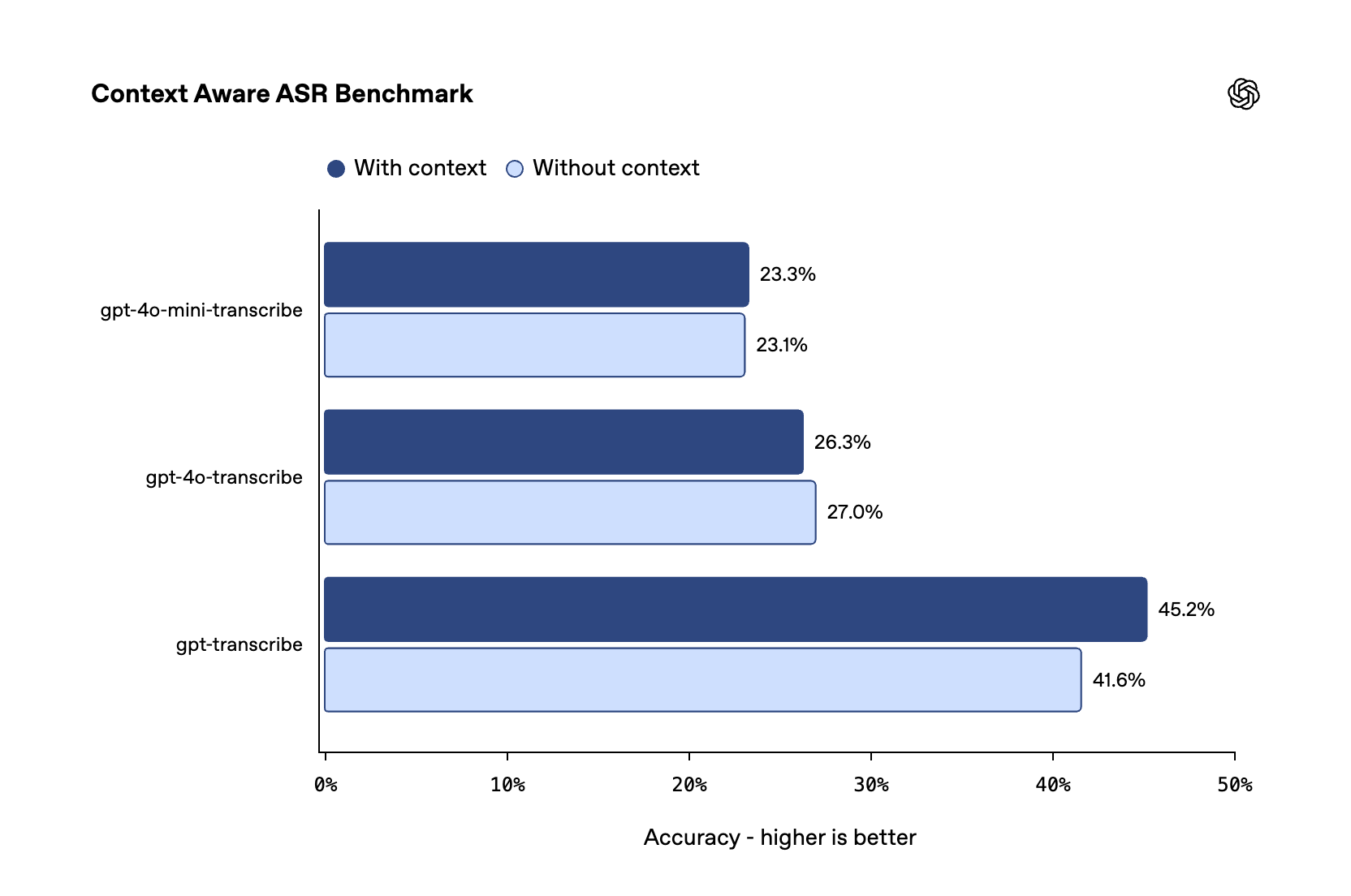
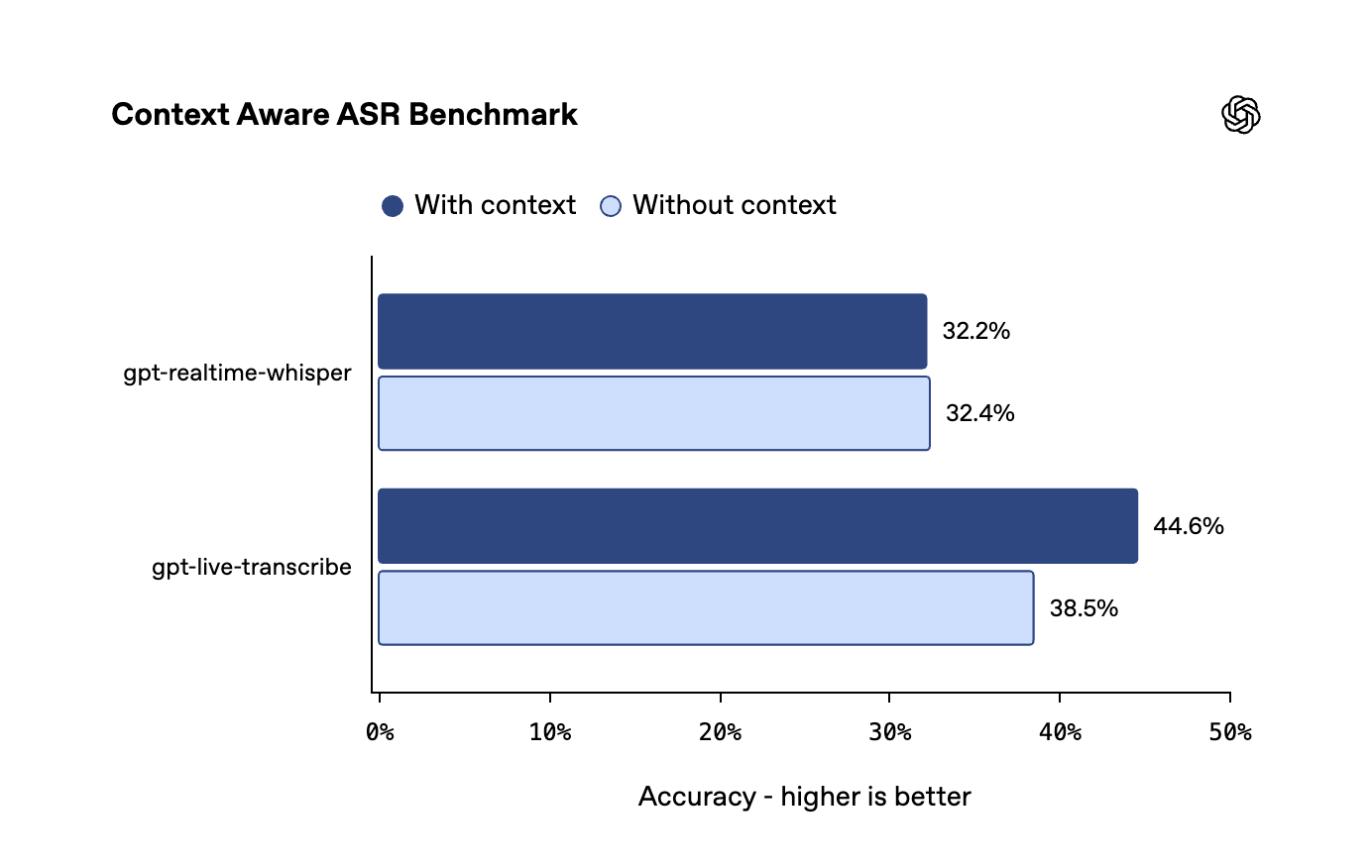
Feed the same context to three older models, and the best result is +0.2 points (essentially flat), with two actually declining. A model has to learn how to use this context during training before it can be said to "understand" it. You can't manufacture that capability by adding a field to the API — feed the prompt to an older model, and it either ignores it or gets thrown off by it.
That also explains why OpenAI shipped this as two new models rather than two new parameters on the old ones. The parameters could have been added at any time; the capability could not.
But there's another side to this chart
The best score on the whole board, gpt-transcribe's 45.2%, sounds far from passing. But what that number actually represents is something outsiders can't really calculate: this is a new benchmark OpenAI wrote, took, and graded itself, with no public dataset, no disclosed construction method, and no disclosed definition of "semantic accuracy." How hard the questions are isn't visible from outside.
So this chart supports exactly one conclusion: on this class of hard cases, the new models are far better than the old ones. It doesn't support "the context problem is solved," and it doesn't support "a score of 45.2 means more than half the answers are wrong" — both of those readings apply a scale that has no absolute units to measure against.
Cheaper — and by a lot
Model launches usually follow the same script: stronger, but pricier, and you weigh the trade-off yourself. Not this time.
per minute
per minute
drops from 15.21% to 8.98%
gpt-transcribe runs $0.0045 per minute. whisper-1, the model it's stepping in for, is $0.006; so is the in-between generation, gpt-4o-transcribe. 25% cheaper than the old default, while the real-world error rate drops by roughly two-fifths — both moving in the right direction at once is unusual for a model launch.
The real-time side plays out differently: gpt-live-transcribe is $0.017 per minute, identical to gpt-realtime-whisper, the model it replaces. Price stayed flat; accuracy ticked up slightly.
| Model | Use case | Per minute |
|---|---|---|
gpt-transcribe | File transcription | $0.0045 |
gpt-live-transcribe | Real-time transcription | $0.017 |
gpt-4o-transcribe | File transcription | $0.006 |
gpt-4o-mini-transcribe | File transcription | $0.003 |
gpt-4o-transcribe-diarize | Transcription + speaker diarization | $0.006 |
whisper-1 | File transcription | $0.006 |
gpt-realtime-whisper | Real-time transcription | $0.017 |
One more line in that table is worth doing the math on: gpt-4o-mini-transcribe is still the cheapest on paper at $0.003 per minute. But its Word Error Rate on real-world audio is 15.46%, about 70% higher than gpt-transcribe's 8.98%.
Whether that's worth it comes down to your rework cost. Transcribe an hour of audio, and the price gap between the two is $0.09 — a bit over half a yuan (at a $0.0015-per-minute difference over 60 minutes, illustrative). If someone has to listen through that hour to fix the extra errors, that half a yuan clearly isn't worth it. If it's bulk audio being roughly triaged where errors don't matter much, mini is still the reasonable pick.
One more detail on pricing methodology: the column header on the pricing page reads "estimated cost." gpt-transcribe, gpt-live-transcribe, and whisper-1 bill purely per audio minute — the per-minute number is exactly what you pay. gpt-4o-transcribe and gpt-4o-mini-transcribe are billed by token, and the $0.006 and $0.003 figures are just estimated conversions for comparison — the actual bill depends on input and output token counts. Comparing their per-unit price directly against the new models isn't quite comparing like with like.
The real-time model lets you dial latency up or down
gpt-live-transcribe has a delay parameter with five settings. The longer the model listens before outputting, the fuller the context it has and the fewer mistakes it makes; push for faster output, and it has to guess more.
least context Longest listen →
fewest mistakes
The official line: exact latency in milliseconds varies by model configuration — don't assume any given tier maps to a fixed delay; test with your own real audio.
Worth noting: nowhere in the entire documentation is there a single millisecond figure. gpt-live-transcribe's headline selling point is "low latency," but exactly how low that "low" is comes with no verifiable number in the launch materials — just five tier names.
Before building live captions, think this through first
Real-time transcription streams out in small pieces — it doesn't wait for a full sentence, and each small piece is officially called a delta. The catch: a later chunk can go back and rewrite text that's already on screen.
Here's an example (illustrative). You say into the microphone, "Book me a flight to Shanghai, flight number CA1501":
So the words already displayed change into CA1501 right in front of the user. That's not a bug — the model is correcting itself — but from the user's point of view, the text just moved on its own.
The hard part is what the interface should do at the moment the text gets rewritten. Replace it directly, and the user sees words jump mid-read. Show the unconfirmed part in a lighter color, and the user knows it might still change, but the whole screen keeps flickering. Wait until a sentence is fully settled to display it, and live captions stop being live. Each option has a cost, and it's on you to pick one.
OpenAI put this on its production checklist. It has nothing to do with model accuracy, and it won't go away no matter how accurate the model gets — as long as text streams out as it's heard, there will always be moments of guess-then-correct.
Another easy-to-miss item in the same checklist: notifications from the model saying "this utterance is done" arrive in no guaranteed order. If two people finish speaking one after another, the notifications may not reach you in that same order — you have to key off each notification's item_id to claim and sort them, not assume arrival order matches speaking order.
What it can't do — this section might matter more than every benchmark above it
Everything below comes straight from OpenAI's own docs. A good benchmark doesn't mean a drop-in swap — check first whether the feature you're relying on today is still there.
| What you need | Can the new models do it? | Use this instead |
|---|---|---|
| Plain transcript (already-recorded files) | Yes | gpt-transcribe |
| Plain transcript (real-time audio stream) | Yes | gpt-live-transcribe |
| Detecting which languages are spoken | Only one of the two new models | gpt-transcribe returns it, for both file and real-time sessions; gpt-live-transcribe does not |
| Word-level timestamps | No | whisper-1 |
| srt / vtt subtitle files | No | whisper-1 |
| Speaker diarization | No | gpt-4o-transcribe-diarize |
| Translating foreign-language audio directly into English | No | whisper-1's translation endpoint |
| Per-word confidence scores | gpt-live-transcribe doesn't provide them | No alternative named in the docs — build a fallback at the application layer |
whisper-1 shows up three times in that table. It's lost its spot as the default for general transcription, but for timestamps, subtitle formats, and translating into English, the docs still explicitly recommend it today — with no replacement offered. There's no deprecation timeline for it on OpenAI's own deprecation page either, so the claim that "whisper-1 is being retired" isn't supported by anything published — it's just no longer the default pick for general transcription.
If you're currently using whisper-1 purely to get a transcript, the case for migrating is straightforward: more accurate, cheaper. If you're using it for video subtitles, there's nowhere to move to yet.
A few more hard rules that will bounce your request outright
25 MB max file size, covering mp3, mp4, mpeg, mpga, m4a, wav, and webm. Anything larger has to be split yourself — and the docs specifically warn against cutting mid-sentence, since losing that context hurts accuracy.
Each keyword entry has to be on a single line, with no <, >, carriage returns, or line breaks. Break that rule once and the entire request is rejected — it doesn't just skip the offending entry. A prompt that exceeds the model's length limit gets the same treatment: the whole request is rejected.
The plural languages field and the older, singular language field can't be sent together — mentioned earlier when covering the three context types, but worth flagging again since it's the easiest thing to miss when migrating old code.
OpenAI's tweet describes gpt-transcribe as optimized "for completed audio files and batch workloads." But the official model page's endpoint-support table explicitly marks v1/batch (the discounted, asynchronous Batch API channel) as "not supported."
Both are official statements. My read is that "batch" here means "you have a large number of files to transcribe," not "routed through the discounted Batch API channel" — but that's just a reading, not something OpenAI has clarified. If your cost model is counting on the Batch API discount, assume it's unsupported until told otherwise.
How OpenAI itself says to test this
The docs devote an entire section to testing methodology. None of it is vendor-specific — it holds for evaluating any company's speech-to-text model — which makes it the most directly useful part of the whole document.
First: don't test with clean samples alone. Record with a real microphone, record over phone audio quality, include accents, background noise, code-switching, and domain terminology, then test a long session too. Work numbers, dates, currency amounts, and email addresses into the test set — exactly where transcription models are most likely to fail, and where humans are most likely to notice.
Second, and more valuable: don't fixate on Word Error Rate alone. The docs' own example: in a medical setting, test whether drug names come through correctly; in a support setting, test whether order numbers come through correctly.
A transcript with a 5% Word Error Rate, if that 5% happens to be drug names and dosages, is useless in a medical setting. Flip it around: a transcript with a 15% error rate where the errors are all filler words like "um" and "so" might be perfectly usable. An average error rate mixes critical mistakes and irrelevant ones into a single, meaningless number.
Third: track three failure modes separately — empty transcripts (nothing comes out at all), truncated transcripts (cut off mid-sentence), and delayed transcripts (output arrives too late). None of these show up well in an aggregate Word Error Rate, but they're the ones that generate the most user complaints in a real product.
Finally, real-time builds need two more things defined up front: settle on your acceptable latency and accuracy targets before tuning delay, not while tuning it, and test every target language separately — don't extrapolate one language's results to the rest.
OpenAI's new transcription models can actually use the context you hand them — old models just ignore it
OpenAI ships gpt-transcribe and gpt-live-transcribe: real-world error rate cut in half, price down 25% per minute — the whole story in one page with charts.
↓ One page, fully readable · one chart animates
OpenAI shipped two speech-to-text models via API — one for already-recorded files, one for live speech. Each has a predecessor it's stepping in for.
→ recorded files
gpt-realtime-whisper
→ live speech
→ recorded files
gpt-live-transcribe
→ live speech
Neither old model was shut down — OpenAI just downgraded them to "use only for special cases." The dividing line is simple: is the audio still being produced? The real-time model runs $0.017 per minute, 3.8x the file model — route recorded audio through the wrong channel and it's pure waste.
The metric is Word Error Rate: compare the machine transcript word-for-word against the correct one and count errors per 100 words — missed, dropped, or inserted words all count. Lower is better.
on real-world audio
on the same test
vs. whisper-1's $0.006
while accuracy improved too
8.98% is roughly one wrong word in 11; 15.21% is one in every six or seven. Proofreading changes from a full re-listen to a quick scan-and-fix. More accurate and cheaper at once is rare for a model launch. Both benchmark sets are OpenAI's own; no third party has reproduced them yet.
The same chart hides something the tweet skips: the in-between generation, gpt-4o-transcribe, scores 22.21% on real-world audio — worse than the very whisper-1 it was meant to succeed. "Each generation beats the last" doesn't hold on this line.
The old models listened blind — no idea whether this was a support call or a doctor's visit, hearing a string of letters and digits and guessing a spelling from the sound. The new models let a request carry three things alongside the audio.
keywords are only a hint: a word never spoken in the audio shouldn't appear in the transcript — you can't force a word in just by listing it. languages is plural, built specifically for recordings that mix multiple languages, switching mid-stream with no manual toggle needed.
So does this actually need a new model? Feed an older model the same background — would it improve too? OpenAI ran each of five models twice: once with no background, once with it.
There's another side to this: even the best score on the board is only 45.2%. This is a new benchmark OpenAI wrote, took, and graded itself — dataset and scoring method both undisclosed, so how hard the questions are isn't visible from outside. This chart supports exactly one conclusion: on this class of hard cases, the new models beat the old ones by a wide margin.
A good benchmark doesn't mean a drop-in swap. Everything below comes straight from OpenAI's own docs.
✔ Stream text out as speech happens, gpt-live-transcribe
✔ A recording that mixes languages, no manual switching mid-stream
✔ Tell you which languages were spoken (only gpt-transcribe returns this)
✘ srt / vtt subtitle files, go back to whisper-1
✘ Tell speakers apart, use gpt-4o-transcribe-diarize
✘ Translate foreign audio directly into English, go back to whisper-1
one wrong word
every 6-7
AC-42's an order
listened blind:
just guessed a
spelling by sound
whisper-1 scores 15.21%
25% below whisper-1's $0.006
the old ones too?
same context to
five models
context
- × What second each word
- × srt / vtt subtitles
- × Tell speakers apart
- × Translate to English
whisper-1
Primary source and reference
- OpenAI 开发者文档 Original publisher