Google Cloud fits AlloyDB with proxy models: AI judgments run locally in the database, up to 23,000x faster
- Google Cloud has added three new AI functions to AlloyDB (its PostgreSQL-compatible database) — ai.analyze_sentiment, ai.summarize, ai.agg_summarize; the earlier ai.generate, ai.rank, ai.if, and ai.forecast are now generally available (GA).
- Smart Batching merges multiple rows into a single call to share prompt overhead — in internal tests up to 2,400x faster than calling a large model row by row, reaching 10,000 rows per second; currently available for ai.if and ai.rank.
- Proxy models (optimized mode) train a lightweight local model based on data vector embeddings for ai.if, making judgments directly inside the database — in internal tests, 100,000 rows per second (23,000x faster), with cost dropping to under a tenth of a cent (6,000x cheaper).
- The approach traces back to Google DeepMind's 2024 NeurIPS paper UQE, paired with this year's SIGMOD 2026 paper — across 10 benchmarks it hits 90% to 102% of a direct large-model call's F1, and even outperforms it at 116% on an Amazon reviews test.
- Proxy models currently support only ai.if and are in preview; scenarios requiring multi-step reasoning, or with extremely imbalanced positive/negative samples, automatically fall back to calling the cloud large model.
Google just put AI judgment straight inside the database
On July 2, 2026, Google Cloud announced a full rollout of a set of "AI functions" for its AI-native database AlloyDB, along with two acceleration capabilities: Smart Batching, and Proxy Models.
What AlloyDB is, and what it means to put AI inside a database
To grasp the weight of this update, you first need two things straight: what AlloyDB actually is, and what "installing Gemini inside it" really changes.
AlloyDB is a relational database on Google Cloud, compatible with PostgreSQL (one of the world's most popular open-source databases — think of it as a Google Cloud-enhanced version of PostgreSQL). Enterprises use it to store orders, users, product reviews, and system logs, and query them with SQL.
Traditional databases share an inherent limitation: they only do exact literal matching. You can easily query "products priced under 100" or "orders with status completed," but you can't directly query "negative reviews complaining about battery life" or "tickets with an angry tone" — that requires understanding the meaning of the text, and a database doesn't understand meaning. Previously, doing this kind of "by-meaning" analysis meant exporting the data, running it through a separate AI pipeline, and importing the results back — slow, and you had to maintain that whole pipeline yourself.
What AlloyDB has done this time is turn Gemini's understanding capability directly into a set of SQL functions (called AI functions) built into the database itself. So now you can write a judgment about "meaning" right inside an ordinary SQL statement, and the database just understands it, picking out the matching rows without moving the data anywhere.
Could only query explicit fields and values:
WHERE price < 100
To analyze "by meaning," you had to export data → external AI pipeline → import back, slow and hard to maintain.
Have AI judge the meaning right in SQL:
WHERE ai.if(review, 'complains about battery')
The database itself understands "complains about battery" — the judgment happens right in this query, and data never leaves the database.
That's the significance here: the database has upgraded from "only matching by the letter" to "querying by meaning," with semantic search, structured queries, and AI judgment all happening in the same SQL layer. Powerful — but it brings a new headache: calling a large model for every row gets slow and expensive fast as row counts climb. So the real centerpiece of this launch isn't the functions themselves, it's how to make them fast and cheap as well as capable.
Exactly which AI functions were added
First, look at what this set of AI functions can do. The most intuitive use case: turning messy, hard-to-parse raw text directly into structured, searchable content within SQL.
For example, using ai.generate to automatically break an error log into structured fields:
"errorCode": "DbConnectionTimeout",
"serviceName": "OrderSvc",
"rootCause": "Failed to acquire a connection from the primary shard pool within a 5000ms timeout"
}
A messy log line gets automatically broken into error code, service name, and root cause fields — instantly queryable and filterable. Three new functions were added this time:
- ai.analyze_sentiment: judges whether a piece of text is positive, negative, or neutral.
- ai.summarize: compresses long text into a summary while preserving the tone and nuance of the original.
- ai.agg_summarize: an aggregate function that combines multiple rows of content (paired with GROUP BY) into a single unified summary.
Added to the already-GA ai.generate, ai.rank, ai.if, and ai.forecast, that's the full lineup of this set of AI functions. For instance, ai.agg_summarize can combine a pile of reviews for one product into one overall verdict: "Multiple users praised the 4K visuals, 120Hz frame rate, and ergonomic controller; some complained the fan noise runs loud during long play sessions. Overall a top-tier console, with heat and noise as minor flaws."
Why it used to be slow and expensive
The most direct way to apply a large model's judgment across an entire table is to call the model once per row. Once row counts climb, that approach falls apart.
InfoQ put the problem in concrete terms: a table of 100,000 products, run through a single full-table judgment, means 100,000 network round trips to Vertex AI. Every single one carries the same system prompt, every one waits on model inference, and every one is billed by the token.
These figures come from Google's technical blog from May of this year. The conclusion is blunt: for operational databases, this speed is too slow; for analytical scenarios, the cost is so high that many full-table semantic analyses simply aren't affordable.
Google breaks through this wall with two moves. First, the big picture — how they relate to row-by-row calling: the further right, the less it touches the cloud large model, and the faster and cheaper it gets:
Let's break down these two moves one at a time below.
Move one: pack many rows into a single call
The idea behind Smart Batching is simple: since every call carries the same system prompt, merge many rows into a single request so that prompt only gets sent once.
100,000 rows = 100,000 requests, the same system prompt resent 100,000 times.
Multiple rows packed into one request, the system prompt sent once, repeated overhead gets amortized away.
Why not just batch it yourself at the application layer? Because batch size is hard to get right: too small, and you barely save on cost and latency; too large, and the stuffed-in prompt bloats, which can trigger hallucination or exceed the model's token limit. AlloyDB automatically computes the optimal batch size per request, and handles retries automatically too.
It can also understand numeric constraints, not just find semantically similar matches. For example: a user on a digital goods marketplace is looking for a camera that "can dive to 60 meters or deeper." Ordinary hybrid search only finds the closest match by semantics and keywords, missing hard numeric constraints, and might recommend a camera rated for only 20 meters. Using ai.if for intelligent filtering, the database actually understands the "depth" constraint and returns only products that meet or exceed 60 meters. With ai.if you also don't have to specify a batch size yourself — AlloyDB handles all that optimization underneath.
Move two: the database trains its own stand-in model to make the call
Batching saves on repeated overhead; proxy models go further: the database trains its own small model that can run locally, taking over most of the judgment work — no longer even asking the large model.
Use a large model to label a small batch of data with "yes/no" tags as a teacher, and train a tiny classifier that consumes vector embeddings. Subsequent queries use this local model to judge directly, producing millisecond results on the database's ordinary CPU, without touching the external large model again. Internal tests show 23,000x faster, cost down 6,000x.
A proxy model is a tiny model trained specifically for one concrete problem and one specific dataset, used only to quickly answer "yes/no"-style judgment questions; whenever it hits a question it can't judge, it automatically hands off to the large model.
Like assigning a teaching assistant who's only studied one type of problem: fast and accurate on that type; switch to a different type of problem, and you need to bring in the actual teacher (the large model).
The whole process splits into two phases: train, then execute
It's split across two SQL statements: PREPARE handles training the model in the background, EXECUTE handles running live queries with the trained model.
Training happens in the background PREPARE phase, where the large-model cost is one-time; the live EXECUTE phase just uses the trained local model to judge. Only when the model's confidence is low, or no matching model is found, does it automatically fall back to calling the large model as a backstop. Here's the two-phase SQL example given officially (via InfoQ):
-- Phase 1: train a local proxy model using a data sample + the cloud large model
PREPARE underwater_suitability_proxy FROM
SELECT description FROM products;

-- Phase 2: run the query at database speed, using the local proxy model
SELECT * FROM products
WHERE ai.if(description, 'suitable for underwater use deeper than 60 meters')
USING proxy(underwater_suitability_proxy);
The English condition in the second statement, suitable for underwater use deeper than 60 meters, is the exact judgment that underwater camera from earlier needs to pass.
InfoQ frames this pattern as a reversal of the usual relationship between database and large model: previously the database was the client, calling out to an external model for every single judgment; now the database is more like a student — it first learns how the model judges on a batch of samples, then applies that at database speed, locally. The large model's role shifts from a runtime that every query depends on, to a teacher who only shows up during training.
How can this stand-in model possibly understand semantics
How can something as simple as logistic regression possibly read meaning into something like "engaging plot"? The key is that what it consumes isn't raw text — it's a vector embedding that already carries semantic information.
Convert the meaning of a piece of text into a string of numbers (a vector): text with similar meaning gets similar number combinations; text with unrelated meaning ends up far apart. It's a bit like plotting every passage's meaning as a coordinate point on a map — the more alike the meaning, the closer the points sit.
A very old, extremely cheap-to-compute statistical judgment method that only does binary "yes/no" decisions, without needing to understand the language itself — it just looks at patterns among the numbers. Like drawing a dividing line on a coordinate plot: one side counts as "yes," the other as "no," and training is finding where that line should go.
Put these two together: embedding models like Gemini and Gecko encode concepts like "engaging plot," "great cinematography," "dull," and "boring" into different dimensional combinations of the vector when they generate it (don't expect any single dimension to be labeled "cinematography"). Training logistic regression is essentially slicing a plane through this (hyper)sphere formed by the embeddings, splitting the semantics into two halves — one judged TRUE, one judged FALSE. Which direction that plane cuts depends on the labels the large model assigned to the training samples.
This is also the signature diagram in Google's blog post — a green plane slicing through the blue embedding sphere:

From there, the ultra-low latency and cost make sense: embeddings are generated only once, and reused repeatedly across subsequent queries — so the cost of bringing semantics into the data gets amortized down to a one-time expense; and logistic regression itself runs on ordinary CPUs, needing no specialized hardware.
How accurate is it? When does it break down?
A proxy model is an approximation method, more limited in capability than the large model. It performs well on problems that can be judged from semantic patterns learnable via embeddings, but doesn't fit complex reasoning or extremely imbalanced samples.
First, accuracy. The SIGMOD 2026 paper compares across 10 benchmarks: the proxy model's F1 ranges from 90% to 102% of the large model's F1; on an Amazon reviews sentiment classification test, the proxy model hit an F1 of 0.860, outperforming the large model's 0.739 — that is, 116%. The paper's explanation: the proxy model is trained on a batch of samples and has seen the global picture, while the large model treats every row as a fresh problem judged from scratch.
F1 score ranges from 0 to 1, measuring both "how accurate the judgment is" and "how completely it finds what it should find" — closer to 1 is better. Below are a few specific tests published in the paper:
| Benchmark | Proxy model F1 | Large model F1 | Ratio |
|---|---|---|---|
| Amazon reviews (sentiment) | 0.860 | 0.739 | 1.16 |
| California real estate (region judgment) | 0.953 | 0.953 | 1.00 |
| Banking77 (intent, requires step-by-step reasoning) | 0.700 | 0.707 | 0.99 |
| FEVER (whether a claim is supported by text) | 0.782 | 0.853 | 0.92 |
Next, when it breaks down — mainly two kinds of scenarios:
Judgments that require chaining multiple semantic concepts together, needing multi-step reasoning, go beyond pattern detection in embedding space, and the proxy model breaks down.
When TRUE or FALSE cases are so scarce sampling can't gather enough of both classes, there's no usable model to train, so the proxy model isn't enabled in this extreme case.
One more thing that's easy to conflate: a proxy model is not the same as vector search. It's a classifier, judging each row TRUE/FALSE (or assigning it to a category); vector search does something else entirely — it ranks results using a general distance function (like cosine distance). And a proxy model is trained specifically for your particular data and particular problem — even if you tried to simulate ai.if purely with vector search, it would be hard to set up well and the results would be diminished. The two are not the same thing.
The bigger the data scale, the bigger the advantage
The cost and time savings from proxy models aren't fixed — the more data, the bigger the advantage. Because training is a one-time cost, it gets amortized over every query afterward; the more you query, the more it pays off.
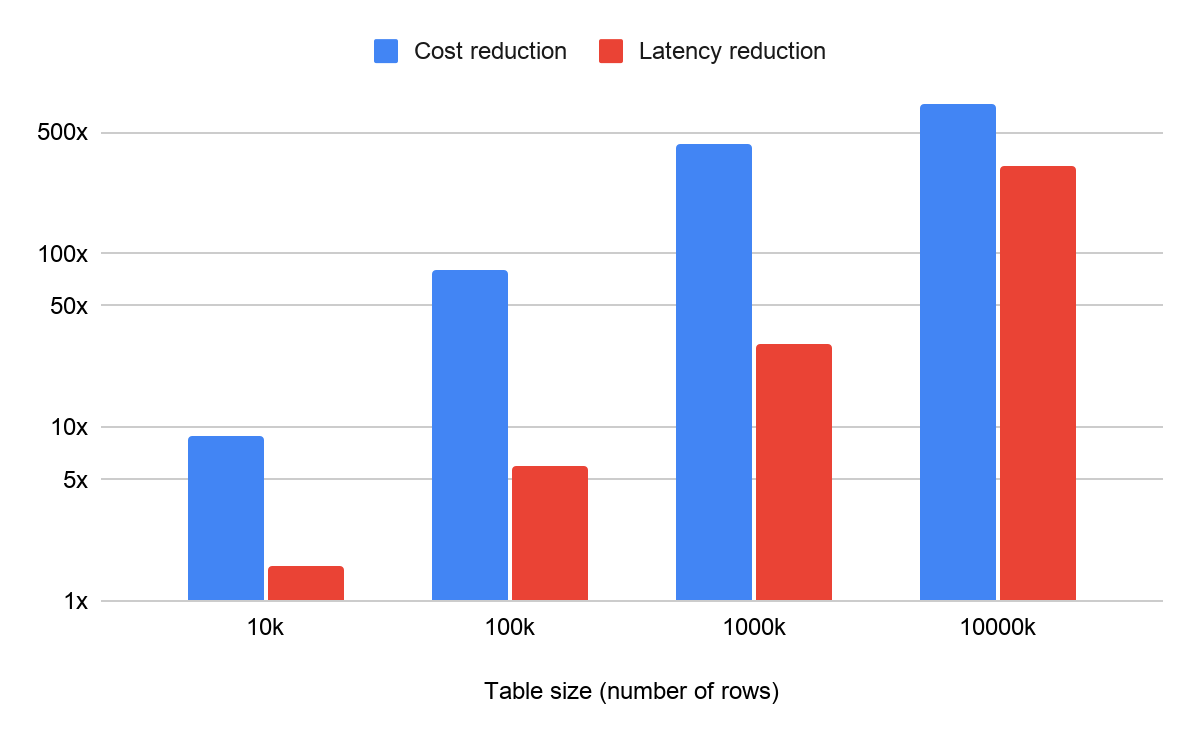
The paper's figures for an online training scenario (BigQuery) look like this:
| Data scale | Token/cost reduction | Query latency speedup |
|---|---|---|
| Millions of rows | ~400x | 30 to 100x |
| Tens of millions of rows | ~600x | ~300x |
As scale grows from millions to tens of millions of rows, both the cost reduction and latency speedup scale up along with it. Applied to AlloyDB, the logic is even more favorable: the large-model cost of the PREPARE phase can be amortized across however many query executions follow — the more a pre-trained model gets used, the lower the per-use cost. The chart below, from the SIGMOD 2026 paper, plots table size on the x-axis: cost reduction and latency speedup keep climbing with scale, approaching roughly 600x cost and 300x latency at tens of millions of rows:
How usable is this right now, and what does it mean for other databases
You need to be clear on how usable this set of capabilities actually is right now — which parts are already GA, and which are still in preview.
| Capability | Current maturity |
|---|---|
| AI functions (ai.generate / ai.rank / ai.if / ai.forecast, etc.) | Generally available (GA), runs on PostgreSQL 17 |
| Smart Batching | GA for ai.if and ai.rank |
| Proxy models (optimized mode) | ai.if only, in preview, requires manually flipping a switch, off by default |
To use proxy models, you need to manually flip a database switch (google_ml_integration.enable_ai_function_acceleration), which is off by default. InfoQ also cautions: figures like 23,000x and 6,000x are internal test numbers, valid only for the preview ai.if function — they don't represent typical performance across all AI functions, and should be tested against your own data distribution and query patterns before going to production.
How practitioners are using it
Starburst architect Raimundas Juodvalkis offered a framing on LinkedIn: treat these as "governed database extensions," not a "magic WHERE clause." His three pieces of advice are:
- Start with read-heavy review-analysis scenarios first — don't jump straight to heavy workloads with it.
- Be cautious before writing model-derived fields back into core systems.
- Track model costs separately from query costs.
What this means for other databases
InfoQ points out that any database that calls an external model for every row's judgment hits the same cost and latency wall. Whether competitors like Aurora, Azure SQL, CockroachDB, and PlanetScale will follow with a similar "query-time distillation" approach, or keep leaving users to build this optimization themselves at the application layer, remains to be seen.
This launch also comes with a managed MCP server for AlloyDB, letting AI agents query database content via the Model Context Protocol (an open protocol that lets AI directly call external tools and data) without building their own MCP infrastructure — on top of the existing ScaNN vector index (supporting up to 10 billion vectors). InfoQ sees AlloyDB positioning itself as a PostgreSQL-compatible database where structured queries, semantic search, and AI judgment all coexist in the same SQL layer.
This pattern flips the usual relationship between database and large model. Previously the database was the client, calling out to an external model for every single judgment; now the database is more like a student — it first learns how the model judges on a batch of samples, then applies that at database speed, locally. The large model's role shifts from a runtime that every query depends on, to a teacher who only shows up during training.InfoQ|Steef-Jan Wiggers, 2026-07-09
The database upgrades from "matching by the letter"
to "querying by meaning"
Google fit its cloud database AlloyDB with a set of AI functions, and made them fast enough to actually use — this page covers the whole article with visuals.
↓ 4 steps to get it · one animated diagram included
AlloyDB is a database on Google Cloud (an enhanced version of PostgreSQL). Enterprises use it to store orders, users, product reviews, querying with SQL.
It has an inherent flaw: it only recognizes the letter, not the meaning:
✘ "Find the negative reviews complaining about the battery" — requires understanding meaning, the database can't
Before, analyzing "by meaning" meant exporting the data, running it through a separate AI pipeline, and importing it back — slow, and you had to maintain that whole pipeline yourself.
Google turned Gemini's understanding capability into a set of SQL functions built right into the database itself. So you can write a judgment about "meaning" in one ordinary line of SQL, with the data never having to leave:
WHERE price < 100
To analyze by meaning: export data → external AI pipeline → import back, slow and hard to maintain.
WHERE ai.if(review, 'complains about battery')
The database understands "complains about battery" on its own — the judgment happens right in this query, data never leaves.
But the new capability brings a new headache: every row needs a call to the large model. A million rows means a million calls — slow and expensive. So the real centerpiece of this launch is the diagram below.
Having AI judge 1 million product reviews:
All of the above is from Google's internal testing; there's no third-party reproduction yet.
complaining about battery…
only reads letters, not meaning
with "battery" in it.
not just mentioning it!
meaning all lost
in one line!
= 1 million calls
the cloud large model once
fast and cheap?
I'll handle the rest myself.
hard ones go to the teacher!
faster
cost down 6,000x
checks the boundaries first
- × Only ai.if is open, one judgment function
- × Still in preview, off by default
- × All the numbers are Google's own internal tests
easy things handled on the spot, hard things escalated.
Primary source and reference
- Google Cloud Original publisher